
You’re trying to stream a movie or join a work call, but your Wi-Fi keeps buffering—even though you pay for high-speed internet. The culprit isn’t your provider or a faulty router; it’s your neighbors. In dense neighborhoods, the 2.4GHz Wi-Fi band is so overcrowded with competing networks that signals collide, turning fast plans into frustratingly slow connections.
To understand why 2.4GHz is a bottleneck, we first need to look at the physics of Wi-Fi signals. The 2.4GHz band has only 3 non-overlapping 20MHz channels (1, 6, 11) for global use, meaning dozens of nearby routers often fight for the same limited space. This congestion is worsened by interference from other devices—microwaves, Bluetooth gadgets, and smart home sensors all operate in the 2.4GHz range, creating noise that disrupts signals. In contrast, the 5GHz band offers 25 non-overlapping 20MHz channels (9 without dynamic frequency selection restrictions), and the 6GHz band adds a game-changing 59 non-overlapping 20MHz channels, with virtually no competing networks in most areas. The difference in bandwidth is equally stark: 2.4GHz tops out at 574Mbps, while 5GHz under Wi-Fi 6 reaches 2.4Gbps, and 6GHz under Wi-Fi 7 pushes toward 9.6Gbps—enough to support multiple 4K streams and online games simultaneously.
Wall penetration is often cited as a downside of 5GHz and 6GHz, but the data tells a nuanced story. 2.4GHz signals lose about 30% of their strength through a standard drywall, while 5GHz loses 35-50% and 6GHz around 40-55%. However, this tradeoff is negligible in most homes. A 5GHz signal can still penetrate 1-2 walls and maintain speeds of 360-511Mbps—far faster than the 100-200Mbps you’d get on a crowded 2.4GHz band. For larger homes, Mesh extenders specifically designed for 5GHz/6GHz can eliminate dead spots without sacrificing speed. The real game-changer is interference reduction: 5GHz networks face 70% less congestion than 2.4GHz, and 6GHz is virtually interference-free, as it’s too new for most older devices to use. Wi-Fi 7 further mitigates range issues with Automated Frequency Coordination, boosting 6GHz broadcast power to match 5GHz coverage.
The physical design of modern routers enhances 5GHz/6GHz performance. These devices feature high-gain antennas with beamforming technology, which focuses signals directly at your devices instead of broadcasting randomly. Many include a dual-core or quad-core processor and 256MB+ of RAM, enabling them to handle up to 128 connected devices without slowdowns. Their compact, streamlined design—with strategically placed heat dissipation grilles and vertical antenna arrays—fits unobtrusively on shelves while maximizing signal dispersion. Most also offer multiple gigabit Ethernet ports and support for Mesh networking, making it easy to expand coverage. Some even include NFC for quick device pairing, eliminating the hassle of sharing passwords.
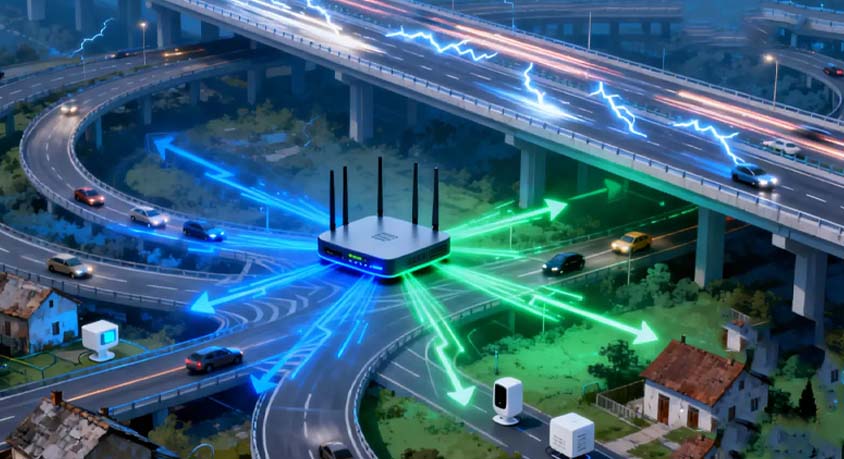
Real-world performance data highlights the difference these bands make. In a dense apartment complex, a 2.4GHz connection might struggle to hit 150Mbps on a 1Gbps plan, with frequent buffering during peak hours. Switching to 5GHz boosts speeds to 600-800Mbps, with consistent performance even when 10+ neighboring networks are active. For gaming, 5GHz reduces latency by 30-40% compared to 2.4GHz, eliminating frustrating lag during online matches. 6GHz takes this further, offering near-wired latency (under 10ms) and supporting 8K streaming or VR applications without a hitch. A small business office with 20+ devices saw a 92% reduction in video call glitches after upgrading to a Wi-Fi 6E router and switching to 6GHz. Wi-Fi 7’s Multi-Link Operation (MLO) technology enhances this even more, allowing devices to connect to both 5GHz and 6GHz simultaneously for aggregated throughput and seamless link switching.
Assessing your environment is the first step to choosing the right band. Use a Wi-Fi analyzer app to scan nearby networks—look for channel occupancy rates (aim for under 30%) and signal strength (measured in dBm). Ideal signal strength ranges from -40dBm to -70dBm; anything below -85dBm will cause frequent dropouts. Check the signal-to-noise ratio (SNR): a value above 25dB is needed for smooth streaming, while below 15dB indicates severe interference. For most homes, 5GHz will be the sweet spot—offering a balance of speed and coverage. If you live in a new building with few 6GHz users and have modern devices, 6GHz is worth the upgrade. Reserve 2.4GHz for smart home devices that don’t require high speed, like thermostats or security cameras.
Like any technology, 5GHz and 6GHz have tradeoffs. 5GHz’s main limitation is reduced coverage in large homes with multiple walls—you may need a Mesh extender to eliminate dead spots. 6GHz has even more limited range (maxing out at ~35m vs. 45m for 5GHz) and requires newer Wi-Fi 6E-compatible devices, which can be a barrier for users with older laptops or phones. Both bands are less reliable for outdoor use compared to 2.4GHz. These bands are ideal for users in dense neighborhoods, remote workers, gamers, and anyone streaming 4K/8K content. They’re less necessary for rural users with few neighbors or those who only use Wi-Fi for basic web browsing on a handful of devices.
Practical guidance for maximizing performance: First, place your router in a central, elevated location—avoid metal cabinets, microwaves, and concrete walls, which can block signals by up to 90%. Second, use your router’s app to split bands (2.4GHz and 5GHz/6GHz as separate networks) so you can manually assign devices to the best frequency. Third, enable OFDMA and beamforming features, which improve multi-device performance and signal focus. Fourth, if coverage is an issue, add a dual-band Mesh extender that supports 5GHz—models with 4 high-performance amplifiers can extend coverage to hard-to-reach areas while maintaining 2402Mbps speeds on 5GHz. Fifth, upgrade to a Wi-Fi 6E router if your devices are compatible; it unlocks the 6GHz band and supports MLO technology, which lets devices switch between bands seamlessly with zero latency.
In summary, the 2.4GHz band’s limited channels and heavy interference are the main causes of slow Wi-Fi in dense areas. Switching to 5GHz or 6GHz resolves this by offering more channels, faster speeds, and minimal interference—even with slightly reduced wall penetration. Wi-Fi 6E routers enhance this further with advanced features like OFDMA and MLO, ensuring smooth performance for multiple devices. Whether you’re working from home, gaming, or streaming, these bands let you get the most out of your internet plan. By assessing your environment, choosing the right band, and optimizing your router setup, you can win the bandwidth war without confronting your neighbors.